Demo: Building an AI Agent in Databricks
AI Agent that leverages Unity Catalog Functions as Tools

In one of my previous blog, I explained AI agents in detail - what Agentic AI is, how it differs from Generative AI, and why it can act independently to achieve complex goals.
If you haven’t read it yet, you can find it here:
 Medha Khurana
In this blog, we’ll move from theory to practice.
But before we build anything, let’s quickly remind ourselves what an agent actually is. Very simply, an AI Agent is a brain (LLM) with access to tools, and the ability to decide which tool to use on its own. For this to work, the brain needs to be defined, it should know what tools it has access to and actually be able to call those tools. A simple analogy is a plumber. A plumber is an agent who has a toolkit and based on the problem he knows which tool he can use to fix the problem.
A tool could be anything:
- Fetching data from an API
- Executing a SQL function
- Searching the web
- Running a ML model
Now what is the benefit of building custom functions as tools?
When we give custom functions as tools to an agent, we are enabling the agent to get verified responses from our data and get deterministic results grounded in business logic.
One important note is to test the tools thoroughly before you give to the LLM for use. If the tool is inaccurate, the agent will still use it confidently.
And that can lead to wrong outcomes at scale.
Now that we understand the role of tools, let’s build one. For this demo, we’ll create a simple tool (function) that calculates the average property size for a given property type. Imagine a leasing agent on a call with a tenant who says - “I’m looking for around 50,000 square feet of warehouse space. What’s typical in your portfolio?" Instead of opening dashboards or running manual queries, the AI agent we’re building can call a SQL function that calculates the average warehouse size across the portfolio and return a data-backed answer instantly.
Step 1: Creating a Function in Unity Catalog
First, we’ll create the function that our AI agent will use as a tool.
We start by importing the DatabricksFunctionClient, which gives us the interface for executing functions in Unity Catalog.
from unitycatalog.ai.core.databricks import DatabricksFunctionClient
client = DatabricksFunctionClient(execution_mode="serverless")
Now let’s define the SQL function.
CREATE OR REPLACE FUNCTION avg_property_size (
    property_name STRING COMMENT "The property name to filter by"
)
RETURNS DOUBLE
LANGUAGE SQL
DETERMINISTIC
COMMENT "Calculates the average property size for a given property name"
RETURN (
    SELECT
        AVG(Size_in_sqft)
    FROM
        dboc_properties
    WHERE
        PropertyName = property_name
)
This function simply calculates the average Size_in_sqft for a given property type.
Once this is created, it becomes available as a function in Unity Catalog, ready to be exposed as a tool.
Step 2: Register the Function as a Tool
Now we define our tool list.
In this demo, we only have one function: avg_property_size.
tool_list_raw = ['avg_property_size']
catalog_name = 'mk_catalog'
schema_name = 'mk_custom'

function_names = []
for tool in tool_list_raw:
  tool = catalog_name + '.' + schema_name + '.' + tool
  function_names.append(tool)
Next, we create a UCFunctionToolkit. This toolkit wraps our Unity Catalog functions and makes them available as LangChain tools.
toolkit = UCFunctionToolkit(function_names = function_names)
tools = toolkit.tools
Step 3: Test the Tool
Before giving the tool to the AI agent, we should test it ourselves. We will test the toolkit using execute_function so we know the tool is available to use by LangChain and we can execute it.
payload = {'property_name': 'Warehouse'}
payload_test_result = client.execute_function(tools[0].uc_function_name, payload)
print(payload_test_result)
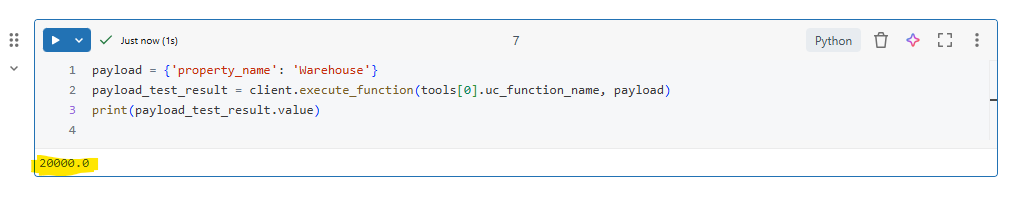
It returned the correct average value, we know:
- The function works
- It’s accessible
- It’s ready to be used by LangChain
So far we’ve built a Unity Catalog function, wrapped it as a LangChain tool and tested it successfully.
Now we move to configuring and executing the agent.
Step 4: Load the LLM Configuration
Next, we initialise the language model that will act as the “brain” of the agent.
llm_endpoint = 'databricks-gpt-oss-20b'
llm_temperature = 0.1
system_prompt = 'You are a helpful assistant. Make sure to use the tools for additional functionality.'

llm_config = ChatDatabricks(
    endpoint=llm_endpoint,
    temperature=llm_temperature
)
ChatDatabricks is provided by the databricks-langchain package that serves as a conversational LLM interface specifically designed for use within LangChain applications.
Step 5: Define the Prompt Template
ChatPromptTemplate.from_messages() helps us create a reusable template for generating a list of messages each with its own role and content that will be sent to a chat focussed LLM in sequence.
prompt_payload = ChatPromptTemplate.from_messages(
    [
        ("system", system_prompt),
        ("placeholder", "{chat_history}"),
        ("human", "{input}"),
        ("placeholder", "{agent_scratchpad}")
    ]
)
Here, system prompt defines behaviour, {chat_history} keeps conversation context, {input} contains the user’s question and {agent_scratchpad} stores intermediate reasoning and tool calls
Step 6: Enable MLFlow Tracing
Before running the agent, we enable tracing. This helps us monitor:
- Tool calls
- Intermediate reasoning
- Execution flow
Very useful when debugging or moving towards production.
mlflow.langchain.autolog()Step 7: Create the Agent
Finally we will define our agent combining everything:
- LLM
- Tools
- Prompt
agent_config = create_tool_calling_agent(
    llm_config,
    tools,
    prompt=prompt_payload
)
Step 8: Execute the Agent
Finally, we run the agent using AgentExecutor. AgentExecutor acts as the orchestrator.
It allows the LLM to:
- Understand the question
- Decide whether a tool is needed
- Call the tool
- Receive the result
- Generate the final response
The verbose=True parameter enables detailed logging of agent's reasoning and tool calling process.
agent_executor = AgentExecutor(agent = agent_config, tools = tools, verbose=True)
response = agent_executor.invoke(
    {
        "input": "What is the average size of properties in the Warehouse?"
    }
)
The final output is explained in below video.
And that’s it.
We started with a SQL function.
Wrapped it as a tool.
Connected it to an LLM.
And allowed the model to decide when to use it building a simple agent.
Conclusion
This was a basic implementation of a single agent on Databricks. From here, you can work towards your business use case, add more tools and perhaps register the model to unity catalog so it is available for re-use by others in your organisation.
If you have read this far, please hit subscribe on top right for new blogs to land straight in your inbox.
Related Content
 Medha Khurana
 Medha Khurana
 Medha Khurana
 Medha Khurana
 Medha Khurana